D2Coding – A Clear Monospaced Font for Developers
D2Coding delivers a clean and consistent coding experience with enhanced character clarity, balanced spacing, and excellent readability. Download this monospaced programming font for Windows, macOS, and Linux to improve code visibility, reduce visual distractions, and create a comfortable development environment.
What is D2Coding?
The D2Coding font is a monospaced typeface released by NAVER Corp., the company behind Korea's largest search portal. It was designed inside NAVER's developer organisation for one job: making source code easy to read for hours, whether it is written in English, Korean, or both.
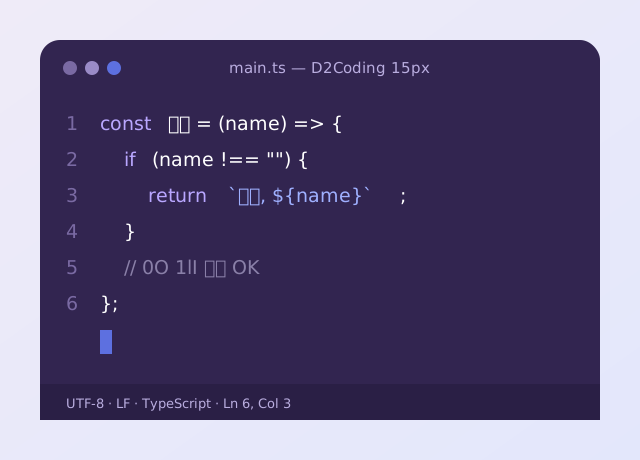
D2Coding font letters all share the same width, so columns, indentation and ASCII tables line up perfectly. Lookalike shapes are pulled apart on purpose: the zero carries an inner mark that sets it apart from capital O, and lowercase l, digit 1 and capital I each get a distinct silhouette.
D2Coding stands out because its Korean Hangul is drawn to the same rhythm as its Latin letters, so Korean comments and strings never look pasted in from another font. The D2Coding font free download is hosted on GitHub under the SIL Open Font License 1.1.
Small family. Big clarity.
D2Coding packs everything a daily coding font needs into a light, dependable family.
Unmistakable characters
D2Coding separates 0 and O, 1, l and I, and other lookalikes so typos jump out in passwords, IDs, hashes and config keys.
Full Korean Hangul
D2Coding includes complete Korean coverage drawn to sit inside the monospaced grid, so mixed-language code stays tidy.
Optional ligatures
D2Coding ligature builds join operators like =>, != and >= into one symbol; the standard build keeps them apart.
Regular & Bold
D2Coding font files come in Regular and Bold — exactly what editors need for keywords and selections.
Open Font License
D2Coding font free download files use OFL 1.1, so you can embed, share and modify them at no cost.
Works everywhere you code
D2Coding runs in every major editor and terminal on Windows, macOS and Linux with no extra setup.
Pick your D2Coding build
D2Coding font download archives on GitHub include every official build. Choose the one that fits how you work.
- Regular and Bold TTF
- No ligatures — great for teaching
- Best for terminals & plain text
- Regular and Bold TTF
- => != >= -> drawn as one glyph
- Ideal for VS Code & JetBrains
- Git, folder and language icons
- Works with Starship & Oh My Zsh
- Patch it yourself in one command
D2Coding releases are published as ZIP files on the repository's Releases page. Version 1.3.2 added separate ligature and non-ligature fonts, and NAVER recommends removing older versions before installing it.
All releasesInstalled in under a minute
D2Coding font installation works like any desktop font. Pick your system and follow the steps.
- 1
Download the release
Open the D2Coding repository, go to Releases and save the latest ZIP. - 2
Extract and select
Unzip the archive and select the.ttffiles you want. - 3
Install for all users
Right-click → Install for all users, then restart your editor. - 4
Or use Chocolatey
choco install d2codingfont
- 1
Download and unzip
Grab the latest release from the official repository. - 2
Open in Font Book
Double-click the font file and press Install Font. - 3
Or use Homebrew
brew install --cask font-d2coding - 4
Restart your apps
Quit and reopen your editor or terminal so it sees the new font.
- 1
Download and unzip
Get the release ZIP from the GitHub repository. - 2
Copy and refresh the cache
mkdir -p ~/.local/share/fonts && cp D2Coding*/*.ttf ~/.local/share/fonts/ && fc-cache -fv - 3
Verify
fc-list | grep -i d2coding
- 1
VS Code — settings.json
"editor.fontFamily": "D2CodingLigature, D2Coding, monospace", "editor.fontLigatures": true - 2
JetBrains IDEs
Settings → Editor → Font → choose D2Coding or D2CodingLigature and tick Enable ligatures. - 3
Terminals
In Windows Terminal or iTerm2, open the profile's appearance settings and set the font face to D2Coding.
D2Coding ligature, one switch away
D2Coding ligature fonts draw common operators as single connected shapes. Flip the switch to compare.
D2Coding ligature display needs two things: the D2CodingLigature font installed and ligatures enabled in your editor. The characters saved in your file never change — only how they look on screen.
D2Coding without ligatures is often clearer for teaching, live coding and screen sharing because every character stays visible. Read the full D2Coding ligature guide to set it up.
D2Coding Nerd Font for a richer terminal
D2Coding Nerd Font builds add thousands of icons — Git branches, folders, language logos and Powerline arrows — on top of the original glyphs, so prompts like Starship and Oh My Zsh render completely.
D2Coding Nerd Font files are not shipped by NAVER. Create your own with the open-source Nerd Fonts font-patcher and you stay in control of exactly which font is patched.
D2Coding vs JetBrains Mono, Jetendard & Monofont
D2Coding is not the only great programming font. Here is an honest side-by-side.
JetBrains Mono
JetBrains Mono is JetBrains' free coding font with a tall x-height, many ligatures and italics — but no Korean glyphs, so Hangul falls back to another font.
Font jetendard
Font jetendard is a community package mixing a JetBrains Mono-style look with Pretendard-style Korean, in weights from Thin to ExtraBold with italics.
Monofont
Monofont is the general name for any fixed-width font, from Consolas to Fira Code. Few monofonts are designed with Korean in mind the way D2Coding is.
| Feature | D2Coding | JetBrains Mono | Jetendard |
|---|---|---|---|
| Price | Free · OFL | Free · OFL | Free |
| Korean Hangul | Built in | No | Yes |
| Ligatures | Separate build | Built in | Yes |
| Weights | Regular, Bold | Thin – ExtraBold + italics | Thin – ExtraBold + italics |
| Maintained by | NAVER | JetBrains | Community |
D2Coding remains the safe pick for Korean developers, while JetBrains Mono is stronger for English-only code. See the full D2Coding vs JetBrains Mono comparison.
D2Coding pros & cons
What we love
- Free for personal and commercial use
- Korean and Latin in perfect harmony
- Clear 0/O and 1/l/I distinction
- Ligature and non-ligature builds
- Tiny family that installs anywhere
Worth knowing
- Only Regular and Bold weights
- No italic style
- Official updates are infrequent
- Nerd Font icons need patching
- Smaller ligature set than JetBrains Mono
D2Coding font questions, answered
D2Coding answers to the questions developers ask most before switching fonts.
Ready to try it?
D2Coding is free and takes a minute to install from the official repository.
DownloadYes. To use a coding font in Word, install the D2Coding font on your computer, restart Microsoft Word, then select D2Coding from the font menu. It works well for code snippets and aligned text. Use your editor to preview programming ligatures, since their appearance can vary between applications.
D2Coding is released by NAVER under the SIL Open Font License 1.1, so you can use it for free in personal and commercial projects, bundle it with software, and even modify it. The only rule is that you cannot sell the font files on their own.
D2Coding font download files are safest when taken from NAVER's official GitHub repository. Every download button on this site points there, so you always get the original, untouched files.
D2Coding ligature builds turn character pairs such as =>, != and >= into single joined symbols, while the regular D2Coding build keeps every character separate. Since version 1.3.2 NAVER ships both builds side by side, so you can pick the one you prefer.
D2Coding was built by a Korean company precisely for Korean developers, so it includes full Hangul coverage. Korean glyphs are drawn to sit neatly in the monospaced grid, which keeps comments and strings aligned with your code.
D2Coding Nerd Font builds are not published by NAVER. They are patched versions that add Powerline and developer icons, made with the open-source Nerd Fonts font-patcher. You can use a trusted community build or patch the original font yourself in a few minutes.
D2Coding works in VS Code once the font is installed on your system. Open Settings, search for Font Family and put 'D2Coding' first in the list. To get joined arrows, use 'D2CodingLigature' and set editor.fontLigatures to true.
JetBrains Mono is excellent for Latin-only code, with taller lowercase letters and a large ligature set. D2Coding wins when you also write Korean, because Hangul and Latin share one consistent design. Many developers simply choose based on whether they need Korean text.
Font jetendard is a free community font package that, as its name suggests, pairs a JetBrains Mono-style look with Pretendard-style Korean. Homebrew lists it with 15 font files from Thin to ExtraBold including italics. It is an option if you want more weights than D2Coding offers.
D2Coding font free download archives include both formats. TTF files install one weight per file and work everywhere. The TTC is a collection that bundles the family into one file, which is handy on Windows and macOS. Installing one of them is enough.
D2Coding needs a fresh start of your editor or terminal after installation, because most apps read the font list only at launch. On Linux run fc-cache -fv first. If an older D2Coding version was installed, remove it before installing the new one.
D2Coding can be self-hosted on a website because the Open Font License allows embedding. Convert the TTF to WOFF2, load it with @font-face, and keep the license file alongside it.